Professional designer and manufacture of CCD machines for ONE STOP SOLUTION.
Language
Professional designer and manufacture of CCD machines for ONE STOP SOLUTION.
The following explains the basic interface and key operation of the sheet printing machine, as well as the function of the keys on the operating interface and how to use them.
Mechanical keys and operation interface basic key introduction
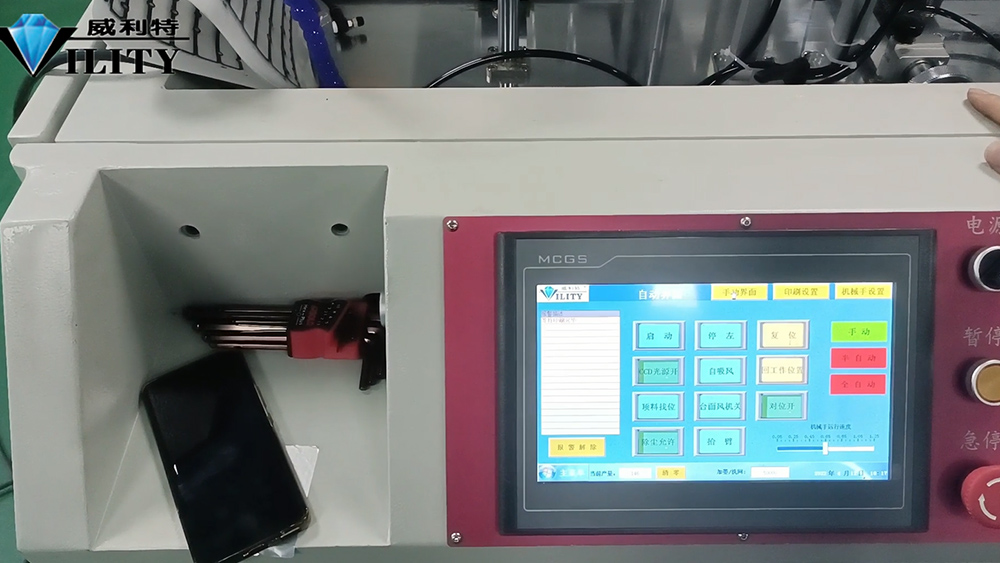
The following explains the basic interface and key operation of the sheet printing machine, as well as the function of the keys on the operating interface and how to use them. First of all, starting from the mechanical keys: the first above the power switch is the total power supply of the machine, the power needs to be turned on when the machine is turned on. The second is the pause button, the pause button is found in the printing process there are bad problems, need to stop to deal with, press the pause button operation will be temporarily stopped; after processing and then continue to press the pause button to open, it will continue to operate to run. The third key is the emergency stop key, this is the same as all common machines above, when an emergency, press the emergency stop key, the whole system will stop operation; after processing the emergency stop key open, and then restart, the machine will run normally. This is the introduction of mechanical keys.
The following is an introduction to some of the most basic key functions on the operating panel. First of all, starting from the manual interface, the first key is the reset key, literally all the procedures, including the robot to reach the zero position; demonstration for you to see. When I click the reset button, all the robot and the robot arm, all the running things to reach the zero position. The second is to return to the working position, when the printing process encountered after the alarm, such as material did not suck up, material did not catch, alignment is not on the time; click back to the working position, all mechanical operating parts will reach the normal production position. Because the machine just stopped at the working position, the machine did not let the axis move after clicking. The third key is the alignment open, the CCD printing machine is now used, in the printing of alignment materials, you need to turn on the alignment; switch on after the ccd will start to alignment printing; if the key is not open, the machine will not go to the alignment printing, the material is printed after all the offset. So when you need to align printing, you must turn on the alignment switch before you turn on the machine.
CONSULT OUR CUSTOMERS FOR SURPRISE DISCOUNTS
Please provide us with the information below to complete your request. Just leave your email or phone number in the contact form so we can send you a free quote for our wide range of designs!

VILITY is a Professional manufacturer, providing ONE-STOP SOLUTION for intelligent printing industry.